AI Security Homelab Part 1: I Built a Vulnerable AI Infrastructure and Pentested It (Reconnaissance)
First post in a series on building an isolated AI security homelab: how the lab was set up, then Phase 1, reconnaissance against a deliberately vulnerable AI infrastructure stack.
- Code assisted
- Writing assisted

This is a series. I’m building my own isolated homelab to learn AI/ML infrastructure security from both offensive and defensive perspectives, working on it, and documenting every phase. The method is fixed: attack → harden → attack again → document. This first post covers how the lab was set up and Phase 1: Reconnaissance. Subsequent phases (vulnerable RAG application, OWASP LLM Top 10, guardrail/gateway defense, AI-SOC/monitoring, automated red-team) will come in separate posts.
Ethical/legal framework: Everything here runs on a deliberately vulnerable training lab: isolated from the internet, running entirely on my own machine, in its own virtual network (DVWA/Vulhub class). No real systems were targeted. Real IPs are replaced with TARGET/ATTACKER, example/instance identifiers with <redacted>. Seeded credentials are fake.
Why AI infrastructure?
Prompt injection and jailbreaking are the visible face of AI security. But in the real world, an LLM doesn’t stand alone: it has infrastructure around it: a tracking server monitoring experiments, an object store holding model files, a vector database for RAG, a notebook environment for development, a runtime serving the model. These components are often deployed without authentication under the assumption of “we’re inside, we’re safe.” When an attacker gets into the network, that’s exactly what they see first.
Ready-made labs target “the application around the model,” but there was no single-roof environment for AI infrastructure reconnaissance and hardening. So I built one myself.
Architecture: two-VM isolated lab
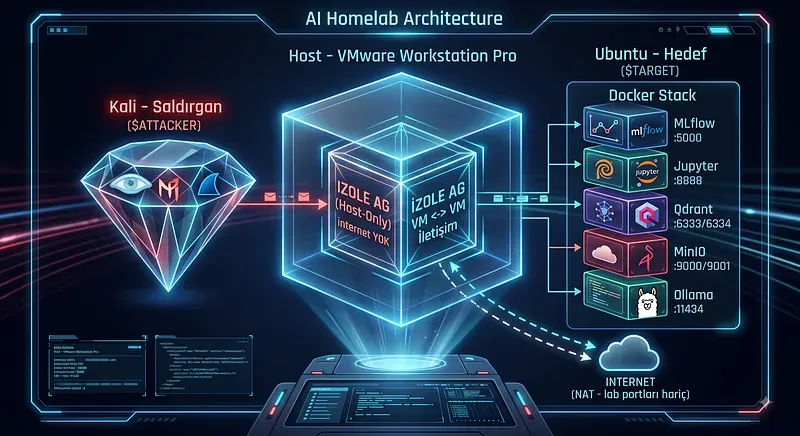
The separation is simple but important: I put the attacker and the target on separate machines.
Kali = attacker. All recon and attack tools live here. Ubuntu Server = target. The vulnerable AI stack runs here; defenses will also be applied here later.
Why two VMs? Because doing recon against a remote IP is far more realistic than scanning localhost. In a real assessment, the target is on another machine. This separation also keeps the attacker/defender discipline clean.
Setting up the lab
VMs
Kali (attacker): 12 GB RAM, 4 vCPU. Ubuntu Server (target): 16 GB RAM, 8 vCPU, minimal install + OpenSSH. The model runs on CPU inside Ubuntu because there’s no GPU passthrough at the virtualization layer; small models (3B class) are sufficient for this.
The foundation of isolation: Host-Only network
In VMware I attached two virtual NICs to each VM: NAT → internet egress (for pulling packages/images/models); does not accept inbound connections from outside. Host-Only → an isolated virtual switch with no internet route, connected only to the VMs. The attacker and target communicate here.
Why not bridged? If bridged, the vulnerable stack would land on the real home/office network. Unauthenticated services and embedded secrets would be visible on the real network. The Host-Only network is the perimeter that makes running this vulnerable box both safe and legal.
Static IP and proof of isolation
I assigned a fixed IP to the target on the Host-Only side (recon commands and port bindings depend on this). The key principle is at the routing level: the default route must only be on the NAT interface; there must be no gateway/route on the host-only interface. This way the lab network cannot send even a single packet to the internet on its own.
Verification (on target):
ip route
# default via <NAT-gw> dev <nat-if>        <-- single default route, on NAT
# <lab-subnet> dev <hostonly-if> scope link  <-- host-only: link scope only, NO
And connectivity test:
# From Kali to target (over host-only) - works
ping -c3 $TARGET
# Both VMs reach the internet over NAT - works
ping -c3 8.8.8.8
The two VMs see each other on the isolated LAN; both can reach the internet via NAT, but the host-only LAN itself has no route to the internet. That is the proof of isolation.
Vulnerable stack
Five services in a single Docker Compose network. These are the same components real ML teams use; security controls are just deliberately disabled:
MLflow: 5000: Experiment tracking + model registry
Jupyter: 8888: Notebook / development
Qdrant: 6333/6334: Vector DB (RAG)
MinIO: 9000/9001: S3-compatible artifact store
Ollama: 11434: Local LLM runtime
Two architectural details worth noting:
Ports are bound only to the host-only IP. In Compose, every port is published as $TARGET:PORT:PORT, not to 0.0.0.0. So the ports never open on the NAT interface. Kali can see them; the internet cannot. I verified this with ss -tlnp: all ports listen only on the host-only IP.
The model lives in a persistent volume. The Ollama model sits in an external Docker volume; it won’t be re-downloaded even if the stack is rebuilt.
Small but realistic lesson: After the first reboot, services didn’t come up. The cause was the absence of a restart: policy in Compose. Containers without a restart policy stay “Exited” after a reboot. Adding restart: unless-stopped fixed it. Instructive from a recon perspective too: seeing “port closed” on a target doesn’t mean “service was removed”: the process may just have stopped. Open services are not permanent.
Phase 1: Reconnaissance
Goal and mindset
The goal of Phase 1: start from a port and extract the service → technology → version → configuration chain, show why a generic scanner isn’t enough, and turn discovery into initial access. The mental framework I applied at every step:
Enumeration = asking questions, not running tools. Every request is a question to the system; the response is data to be interpreted. Label ≠ reality. Never conflate what the tool says with ground truth. Two hats: for every finding, ask both “how would I exploit this?” (attacker) and “if I built this, why would it be this way?” (developer). Think chain, not finding. The value is in how facts connect to an attack path. Note the negative too. An empty database is still a finding: “system exists but no data yet.”
Step 1: Broad scan, and why nmap misleads
nmap -sV -p- $TARGETPORT STATE SERVICE VERSION
22/tcp open ssh OpenSSH 10.2p1 Ubuntu 2ubuntu3.5 (Ubuntu Linux; protocol 2.0)
5000/tcp open http Uvicorn
6333/tcp open unknown
6334/tcp open unknown
8888/tcp open http Tornado httpd 6.5.7
9000/tcp open http Golang net/http server
9001/tcp open http Golang net/http server
11434/tcp open http Golang net/http serverNmap found the open ports but couldn’t identify the AI services: it labeled most as generic “http/Golang net/http server” and left two ports as “unknown.” The reason lies in how nmap works: it sends probes to the port (GET/HEAD/OPTIONS…), compares the response against a fingerprint database, and prints a generic label if there isn’t enough of a match. Ollama genuinely speaks HTTP (on top of Go net/http), so “Golang net/http server” isn’t wrong. It just doesn’t know the application on top is Ollama.
Lesson: nmap tells you “where something exists,” not “what that something is.” In AI infrastructure, nmap is the starting point, not the final word.
Step 2: Fingerprinting: the real identity of each port
nmap -p 5000,6333,6334,8888,9000,9001,11434 -sV --script=http-title,http-headers $TARGETPORT STATE SERVICE VERSION
5000/tcp open http Uvicorn
|_http-server-header: uvicorn
|_http-title: MLflow
| http-headers:
| date: Sun, 09 Aug 2026 06:00:39 GMT
| server: uvicorn
| content-disposition: inline; filename=index.html
| content-type: text/html; charset=utf-8
| content-length: 701
| last-modified: Mon, 03 Aug 2026 11:19:58 GMT
| cache-control: no-cache
| etag: "1785755998.0-701-3609271048"
| date: Sun, 09 Aug 2026 06:00:40 GMT
| accept-ranges: bytes
| x-content-type-options: nosniff
| x-frame-options: SAMEORIGIN
| connection: close
|
|_ (Request type: HEAD)
6333/tcp open unknown
| fingerprint-strings:
| DNSStatusRequestTCP, DNSVersionBindReqTCP, Help, RPCCheck, RTSPRequest:
| HTTP/1.1 400 Bad Request
| content-length: 0
| connection: close
| date: Sun, 09 Aug 2026 06:00:23 GMT
| GenericLines:
| HTTP/1.1 408 Request Timeout
| content-length: 0
| connection: close
| date: Sun, 09 Aug 2026 06:00:22 GMT
| GetRequest:
| HTTP/1.0 200 OK
| content-length: 112
| content-type: application/json
| vary: Origin, Access-Control-Request-Method, Access-Control-Request-Headers
| date: Sun, 09 Aug 2026 06:00:22 GMT
| {"title":"qdrant - vector search engine","version":"1.19.0","commit":"74f3e85b9473c62560006c043e13737ce6b48412"}
| HTTPOptions:
| HTTP/1.0 404 Not Found
| content-length: 0
| vary: Origin, Access-Control-Request-Method, Access-Control-Request-Headers
| date: Sun, 09 Aug 2026 06:00:22 GMT
| NULL:
| HTTP/1.1 408 Request Timeout
| content-length: 0
| connection: close
| date: Sun, 09 Aug 2026 06:00:18 GMT
| SSLSessionReq, TerminalServerCookie:
| HTTP/1.1 400 Bad Request
| content-length: 0
| connection: close
|_ date: Sun, 09 Aug 2026 06:00:22 GMT
6334/tcp open unknown
8888/tcp open http Tornado httpd 6.5.7
| http-title: JupyterLab
|_Requested resource was /lab?
|_http-server-header: TornadoServer/6.5.7
| http-headers:
| Server: TornadoServer/6.5.7
| Content-Type: text/html; charset=UTF-8
| Date: Sun, 09 Aug 2026 06:00:40 GMT
| X-Content-Type-Options: nosniff
| Content-Security-Policy: frame-ancestors 'self'; report-uri /api/security/csp-report
| Etag: "7e8febd991b1142c03a0f5b5e48672d6572a84b5"
| Content-Length: 4252
| Set-Cookie: username-192-168-56-10-8888="2|1:0|10:1786255240|27:username-192-168-56-10-8888|228:eyJ1c2VybmFtZSI6ICI0Mzc4OTlkZGU3MzU0ZDRjYmI4NWU0OGZjN2YwZTlmYyIsICJuYW1lIjogIkFub255bW91cyBDaGFsZGVuZSIsICJkaXNwbGF5X25hbWUiOiAiQW5vbnltb3VzIENoYWxkZW5lIiwgImluaXRpYWxzIjogIkFDIiwgImNvbG9yIjogbnVsbCwgImF2YXRhcl91cmwiOiBudWxsfQ==|54751d2d1dcbc82a901e897b7ee7a09909efaf3392e181c1061e4ff5f0e0c2af"; expires=Tue, 08 Sep 2026 06:00:40 GMT; HttpOnly; Path=/
| Set-Cookie: _xsrf=2|91bc8855|14d512e56dcb86643025018d1990bb37|1786255240; expires=Tue, 08 Sep 2026 06:00:40 GMT; Path=/
| Connection: close
|
|_ (Request type: GET)
9000/tcp open http Golang net/http server
| http-headers:
| Content-Type: text/html; charset=utf-8
| Location: http://192.168.56.10:9001
| Strict-Transport-Security: max-age=31536000; includeSubDomains
| Vary: Origin
| X-Amz-Id-2: dd9025bab4ad464b049177c95eb6ebf374d3b3fd1af9251148b658df7ac2e3e8
| X-Amz-Request-Id: 18CA0DAD47A754DA
| X-Content-Type-Options: nosniff
| X-Xss-Protection: 1; mode=block
| Date: Sun, 09 Aug 2026 06:00:40 GMT
| Content-Length: 61
| Connection: close
|
|_ (Request type: GET)
|_http-server-header: MinIO
|_http-title: Did not follow redirect to http://192.168.56.10:9001
| fingerprint-strings:
| FourOhFourRequest:
| HTTP/1.0 400 Bad Request
| Accept-Ranges: bytes
| Content-Length: 303
| Content-Type: application/xml
| Server: MinIO
| Strict-Transport-Security: max-age=31536000; includeSubDomains
| Vary: Origin
| X-Amz-Id-2: dd9025bab4ad464b049177c95eb6ebf374d3b3fd1af9251148b658df7ac2e3e8
| X-Amz-Request-Id: 18CA0DAC17862AD3
| X-Content-Type-Options: nosniff
| X-Xss-Protection: 1; mode=block
| Date: Sun, 09 Aug 2026 06:00:34 GMT
| <?xml version="1.0" encoding="UTF-8"?>
| <Error><Code>InvalidRequest</Code><Message>Invalid Request (invalid argument)</Message><Resource>/nice ports,/Trinity.txt.bak</Resource><RequestId>18CA0DAC17862AD3</RequestId><HostId>dd9025bab4ad464b049177c95eb6ebf374d3b3fd1af9251148b658df7ac2e3e8</HostId></Error>
| GenericLines, Help, RTSPRequest, SSLSessionReq:
| HTTP/1.1 400 Bad Request
| Content-Type: text/plain; charset=utf-8
| Connection: close
| Request
| GetRequest:
| HTTP/1.0 400 Bad Request
| Accept-Ranges: bytes
| Content-Length: 276
| Content-Type: application/xml
| Server: MinIO
| Strict-Transport-Security: max-age=31536000; includeSubDomains
| Vary: Origin
| X-Amz-Id-2: dd9025bab4ad464b049177c95eb6ebf374d3b3fd1af9251148b658df7ac2e3e8
| X-Amz-Request-Id: 18CA0DA8975280FB
| X-Content-Type-Options: nosniff
| X-Xss-Protection: 1; mode=block
| Date: Sun, 09 Aug 2026 06:00:19 GMT
| <?xml version="1.0" encoding="UTF-8"?>
| <Error><Code>InvalidRequest</Code><Message>Invalid Request (invalid argument)</Message><Resource>/</Resource><RequestId>18CA0DA8975280FB</RequestId><HostId>dd9025bab4ad464b049177c95eb6ebf374d3b3fd1af9251148b658df7ac2e3e8</HostId></Error>
| HTTPOptions:
| HTTP/1.0 200 OK
| Vary: Origin
| Date: Sun, 09 Aug 2026 06:00:19 GMT
|_ Content-Length: 0
9001/tcp open http Golang net/http server
| http-headers:
| Accept-Ranges: bytes
| Content-Length: 1309
| Content-Security-Policy: default-src 'self' 'unsafe-eval' 'unsafe-inline'; script-src 'self' https://unpkg.com; connect-src 'self' https://unpkg.com;
| Content-Type: text/html
| Last-Modified: Sun, 09 Aug 2026 06:00:40 GMT
| Referrer-Policy: strict-origin-when-cross-origin
| Server: MinIO Console
| X-Content-Type-Options: nosniff
| X-Frame-Options: DENY
| X-Xss-Protection: 1; mode=block
| Date: Sun, 09 Aug 2026 06:00:40 GMT
| Connection: close
|
|_ (Request type: HEAD)
| fingerprint-strings:
| GenericLines, SSLSessionReq:
| HTTP/1.1 400 Bad Request
| Content-Type: text/plain; charset=utf-8
| Connection: close
| Request
| GetRequest, HTTPOptions:
| HTTP/1.0 200 OK
| Accept-Ranges: bytes
| Content-Length: 1309
| Content-Security-Policy: default-src 'self' 'unsafe-eval' 'unsafe-inline'; script-src 'self' https://unpkg.com; connect-src 'self' https://unpkg.com;
| Content-Type: text/html
| Last-Modified: Sun, 09 Aug 2026 06:00:19 GMT
| Referrer-Policy: strict-origin-when-cross-origin
| Server: MinIO Console
| X-Content-Type-Options: nosniff
| X-Frame-Options: DENY
| X-Xss-Protection: 1; mode=block
| Date: Sun, 09 Aug 2026 06:00:19 GMT
!doctype html>
|_http-title: MinIO Console
|_http-server-header: MinIO Console
11434/tcp open http Golang net/http server
|_http-title: Site doesn't have a title (text/plain; charset=utf-8).
| fingerprint-strings:
| FourOhFourRequest:
| HTTP/1.0 404 Not Found
| Content-Type: text/plain
| Date: Sun, 09 Aug 2026 06:00:34 GMT
| Content-Length: 18
| page not found
| GenericLines, Help, LPDString, RTSPRequest, SIPOptions, SSLSessionReq, Socks5:
| HTTP/1.1 400 Bad Request
| Content-Type: text/plain; charset=utf-8
| Connection: close
| Request
| GetRequest:
| HTTP/1.0 200 OK
| Content-Type: text/plain; charset=utf-8
| Date: Sun, 09 Aug 2026 06:00:19 GMT
| Content-Length: 17
| ***Ollama is running***
| HTTPOptions:
| HTTP/1.0 405 Method Not Allowed
| Allow: HEAD, GET
| Content-Type: text/plain
| Date: Sun, 09 Aug 2026 06:00:19 GMT
| Content-Length: 22
| method not allowed
| OfficeScan:
| HTTP/1.1 400 Bad Request: missing required Host header
| Content-Type: text/plain; charset=utf-8
| Connection: close
|_ Request: missing required Host header
| http-headers:
| Content-Type: text/plain; charset=utf-8
| Date: Sun, 09 Aug 2026 06:00:40 GMT
| Content-Length: 17
| Connection: close
|
|_ (Request type: HEAD)
5 services unrecognized despite returning data. If you know the service/version, please submit the following fingerprints at https://nmap.org/cgi-bin/submit.cgi?new-serviceI read the header, error message, and response body to pin down each service precisely (--script=http-title,http-headers + manual curl). Every port gave itself away somewhere:
| Port | Service | Evidence |
|---|---|---|
| 5000 | MLflow (on Uvicorn) | server: uvicorn, http-title: MLflow |
| 6333 | Qdrant 1.19.0 | JSON in GET response: {"title":"qdrant - vector search engine","version":"1.19.0"} |
| 6334 | Qdrant gRPC | Port open, not HTTP (verified below) |
| 8888 | JupyterLab (Tornado 6.5.7) | http-title: JupyterLab, Server: TornadoServer/6.5.7 |
| 9000 | MinIO API | Server: MinIO, X-Amz-* headers, XML error body |
| 9001 | MinIO Console | Server: MinIO Console |
| 11434 | Ollama | Body: Ollama is running |
Every identification here came from the content of the response, not the tool’s label.
Step 3: Service-by-service enumeration
MLflow (Tracks experiments, stores models, and manages the machine learning lifecycle.)
The first request returned a parameter error, but the error message itself is a disclosure (speaking JSON API, not asking for auth). With valid parameters:
curl "http://$TARGET:5000/api/2.0/mlflow/experiments/search?max_results=10"{"experiments":[{"experiment_id":"0","name":"Default",
"artifact_location":"/mlflow/artifacts/0","lifecycle_stage":"active", ...}]}Experiment metadata returned without authentication. A small but valuable detail: artifact_location is a local path (/mlflow/artifacts/0), meaning artifacts aren’t connected to MinIO yet. This is a “tell” that reveals the architecture. registered-models/search returned : the registry is empty.
Qdrant (Vector database for semantic search and RAG pipelines, REST + gRPC.)
The REST side is open:
curl http://$TARGET:6333/collections
# {"result":{"collections":[]},"status":"ok"}   <-- boş: henüz veri yok
The gRPC port (6334) gave curl an “HTTP/0.9” error because the language spoken there isn’t HTTP. grpcurl failed on the first attempt expecting TLS; since the lab is plaintext I added -plaintext and gRPC reflection was open:
grpcurl -plaintext $TARGET:6334 list
# qdrant.Collections / qdrant.Points / qdrant.Snapshots ...
Reflection dumped the entire API surface (create, delete, upsert, search… on Collections/Points). This is a detail nmap could never give. But there’s a critical reasoning step here: listing a capability doesn’t mean an anonymous user can exercise it. So I tested it (a safe, reversible write):
curl -X PUT http://$TARGET:6333/collections/pentest \
  -H 'Content-Type: application/json' -d '{"vectors":{"size":4,"distance":"Cosine"}}'
# {"result":true,"status":"ok"}   <-- yazma YETKİSİ var
curl -X DELETE http://$TARGET:6333/collections/pentest
“Capability listing” was an observation; a single safe operation turned it into proven authorization.
Jupyter (Interactive coding environment used by data scientists.)
The Contents API was open without authentication. Navigating the directory I reached a notebook:
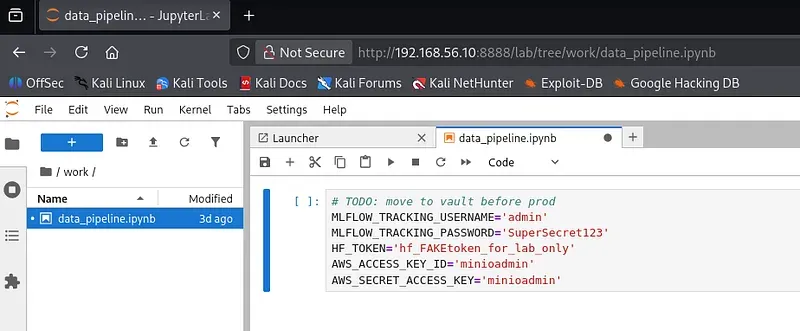
curl http://$TARGET:8888/api/contents/work/data_pipeline.ipynbInside the notebook was the classic developer mistake: secrets embedded in source code (all seeded fake values for the lab, additionally masked here):
MLFLOW_TRACKING_USERNAME='admin'
MLFLOW_TRACKING_PASSWORD='SuperSecret123'
HF_TOKEN='hf_FAKEtoken_for_lab_only'
AWS_ACCESS_KEY_ID='minioadmin'
AWS_SECRET_ACCESS_KEY='minioadmin'
I read this without auth. I also decoded the Set-Cookie: username-… base64 blob in the header:
{"username":"<redacted>","name":"Anonymous Themisto","display_name":"Anonymous Themisto", ...}Jupyter is giving me an “Anonymous” identity without authentication. Header-level proof of tokenless access. Lesson: decode every encoded blob; the thing “skipped without reading” is often the finding itself.
But reading files is the small half of this finding. Tokenless Jupyter = arbitrary code execution. Opening http://$TARGET:8888 in a browser requires no login; running !id in a new notebook means executing commands inside the target container. This is unauthenticated RCE.
MinIO (S3-compatible object storage frequently used for model artifacts.)
And a comment I needed to correct. The first instinct was misleading:
curl http://$TARGET:9000
# <Error><Code>AccessDenied</Code>...</Error>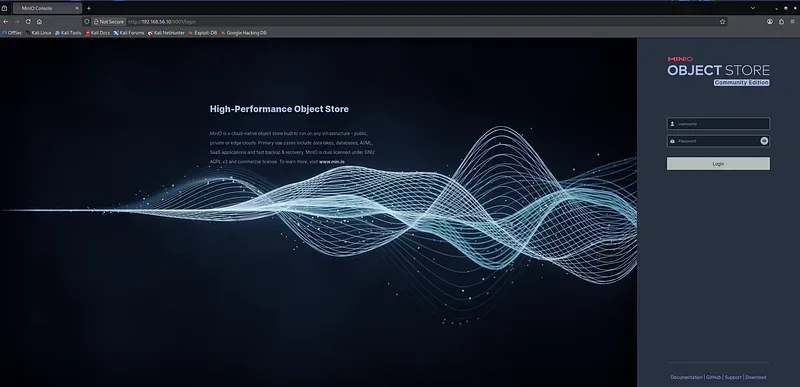
It’s easy to think “AccessDenied → must be secure.” Wrong. MinIO returning AccessDenied to an anonymous request is not a security measure: it’s the default behavior of the S3 protocol. Every S3 does this. The real vulnerability here isn’t that the door is locked; it’s that the key is under the mat: the vendor’s well-known default minioadmin:minioadmin. With the credential found in Jupyter (same default), I logged into the console at $TARGET:9001 as admin. Mistaking “anonymous was rejected” for “secure” is one of the most expensive interpretation errors in a pentest.
Ollama (Local runtime for running LLMs on your own hardware.)
/api/tags returned information far richer than nmap could ever provide. Which models, format, size, quantization, context limit, capabilities:
curl http://$TARGET:11434/api/tags
# qwen2.5:3b  -> capabilities: ["completion","tools"]
# llama-guard3:1b -> bir guard/safety model
The qwen2.5:3b model has the tools capability. That means it supports function calling. This tells us that beyond plain RAG, a tool-using agent could be set up later, and the OWASP LLM06:2025 Excessive Agency surface is open. To prove open compute (denial-of-wallet surface + later a prompt-injection target):
curl http://$TARGET:11434/api/generate \
  -d '{"model":"qwen2.5:3b","prompt":"merhaba","stream":false}'
If a completion returns: anyone on the network can run the model for free.
Step 4: Chain: turning recon into initial access
The crown of Phase 1 is not individual findings but their chain:
Tokenless Jupyter  ──►  unauthenticated notebook access  ──►  embedded credential
        │                                                              │
        ▼                                                              ▼
   arbitrary code execution (RCE)                        same credential → MinIO admin
A weakness in one service (Jupyter’s openness) produced fully authorized access to another service (MinIO). Real attacks progress this way: not a single open port, but the chaining of exposures.
Step 5: Mapping findings to frameworks
Open MLflow experiment/registry: STRIDE = Information Disclosure; MITRE ATLAS = Discovery → Discover AI Artifacts AML.M0005; OWASP LLM03 = Supply Chain
Writable Qdrant: STRIDE = Info Disclosure + Tampering; OWASP LLM08 (Vector & Embedding Weaknesses)
Tokenless Jupyter: RCE: STRIDE = Elevation of Privilege; MITRE ATLAS = Execution (User Execution) AML.CS0018 Arbitrary Code Execution with Google Colab; OWASP LLM side: indirectly LLM03 (if the development pipeline is compromised → supply chain)
Default MinIO credentials: STRIDE = Spoofing (impersonating as admin); MITRE ATLAS = Initial Access → Valid Accounts; OWASP LLM03 (Model Artifact Repository = Supply Chain)
Open Ollama inference: STRIDE = DoS / denial-of-wallet; ATLAS = ML Model Access → ML Model Inference API Access; OWASP LLM10 (Unbounded Consumption). The tools capability is a future door to LLM06 (Excessive Agency).
Step 6: Defensive mirror (first look at blue team)
All this recon left traces on the target. I put on the defender’s hat and read my own tracks:
docker compose logs --since 1h minio
docker compose logs --since 1h jupyter
docker compose logs --since 1h qdrant
docker compose logs --since 1h ollama
A treasure: the <Resource>/nice ports,/Trinity.txt.bak</Resource> string in MinIO’s XML error body. This is nmap’s classic signature probe. So seeing “Trinity.txt.bak” in the logs = “someone nmap’d me.”
Phase 1: summary of findings
| Service | Finding | Impact |
|---|---|---|
| Jupyter | No token → notebook read + arbitrary code execution | Unauthenticated RCE |
| Jupyter | Default credentials embedded in notebook | Lateral movement (MinIO admin) |
| MinIO | minioadmin:minioadmin default |
Full access to model/artifact store |
| MLflow | Unauthenticated experiment/registry API | Information disclosure + architecture leak |
| Qdrant | Unauthenticated REST + gRPC, writable | Vector DB manipulation (LLM08) |
#6 Open inference API, tools capability, Denial-of-wallet + agentic surface
Takeaways
nmap is the start, not the diagnosis. AI services reveal themselves through the content of responses: headers, errors, body, gRPC reflection.
Capability ≠ authorization. A method existing in the API doesn’t mean it can be executed anonymously; a single safe test turns this into evidence.
AccessDenied ≠ secure. Don’t mistake default protocol behavior for a security control; the real question is “are there default/weak credentials?”
Value is in the chain. What moved Phase 1 from “mapping” to “initial access” was the Jupyter → credential → MinIO chain.
Attack leaves patterns for the defender. Reading your own tracks is the first and cheapest lesson for blue team.
Hardening preview and what’s next
Every one of these findings has a corresponding defense: auth on MLflow/Jupyter, API key on Qdrant, changing MinIO defaults, moving secrets to a vault, and once the application layer arrives: guardrail + gateway + observability. I’ll apply these and repeat the same recon until I get 401/403. That “before/after” difference will be concrete proof of why the defense works.
Next post: Phase 2: I’ll connect these components into a real RAG chatbot web application (document → Qdrant, run → MLflow, artifact → MinIO), operate it, then repeat recon on the “live” system and show the difference from the dead system. Then in Phase 3, OWASP LLM Top 10 attacks on the application, Phase 4 defensive build and API monitoring, Phase 5 AI-SOC/SIEM, Phase 6 advanced automation and threat modeling.
One post per phase. More to come.
This post is a learning journal; the techniques were applied exclusively on the author’s own isolated lab. Reconnaissance/scanning against systems without authorization is a criminal offense in most countries.